
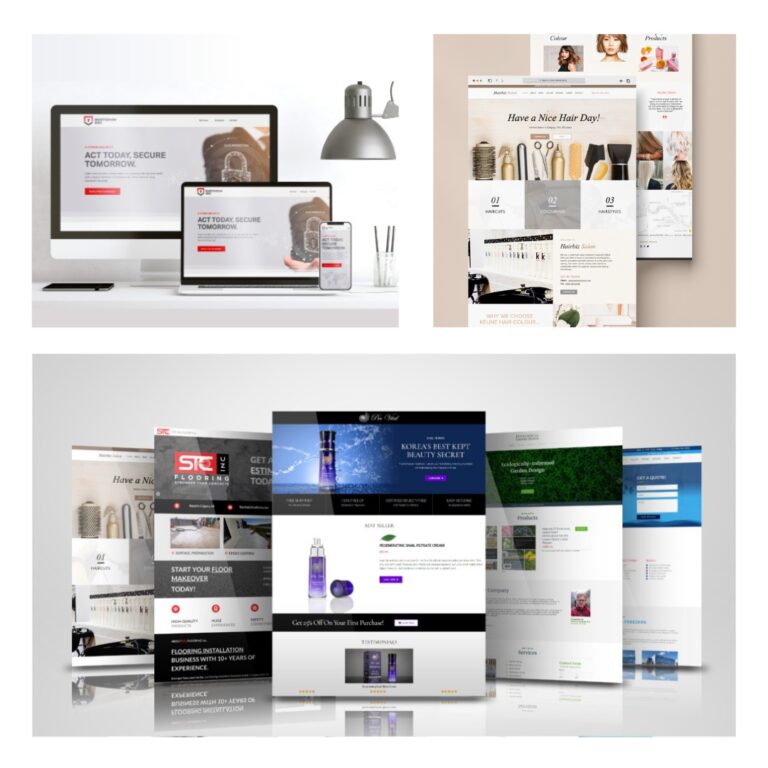
Website Design Services in Regina, SK
Your website should help your business grow, not hold it back
Many small to medium-sized business websites struggle with unclear messaging, confusing navigation, or low engagement.
As a freelance web designer in Regina, I design and build websites that reduce those barriers, so visitors can understand your offering quickly and take action with less friction.
Each site is custom-designed to reflect your brand and built to support key user journeys across all devices.
Whether you want to attract more customers, increase sales, or refresh your online presence, the focus is on making your website clearer, easier to use, and more effective.
Services Overview
Website Design & Development for Growing Businesses in Regina
I help businesses bring their vision to life with Brand-New Websites, Website Redesigns, and Landing Page Design.
I also offer SEO and Google Ads Management to help you reach your target audience and drive traffic.
Website Design & Development Experience
Platforms & Themes
- WordPress.com: Astra, Blocksy, and other premium/paid themes (customization & child themes)
- Shopify, Weebly, Wix, Google Sites
- Theme & Layout Work: Theme integration, child theme creation & customization to match brand visual identity and directions
- Responsive design: Ensuring websites work across devices
Page Builders
Elementor, Greenshift, Gutenberg
Custom layouts, landing pages, theme & template integration
Features & Functionality
Lead Capture Forms: WPForms, Contact Form 7
Booking / Events: Amilia, Arlo, Event Calendar
- Media / Gallery: Envira Gallery
eCommerce: WooCommerce
- Membership / Sign‑Up: Ultimate Member
SEO: RankMath, Yoast
Security & Performance: Wordfence, WP Rocket.
- Minor Site Fixes: Plugin troubleshooting and conflict resolution, minor code modifications
Hosting & Performance
Hosting & Control Panels:
- Hostinger, SiteGround, Bluehost, Hostpapa, etc.
- cPanel, hPanel
- Staging site setup and workflow for safe testing
Performance & Optimization:
Cloudflare (CDN), Caching, image optimization.
- Updating PHP version and resolving any issues that arise.
Website Design Process
How it works
JPcreative’s web design process is tuned to cater to prospective clients whether you are business owner or individual who are seeking a professional web designer in Regina, Saskatchewan.
1-Discovery & Project Scoping
- Discovery Phase: Discuss your project goals, requirements, any existing challenges, desired features, target region & audience, and if there’s an existing logo & visual identity.
- Project Scope: Translate discovery into a concrete plan, including:
- Pages: Number and types of pages (home, about us, contact, service or product pages, etc.)
- Features: Required functionalities (booking calendar, sign up, contact forms, blog, e-commerce, etc.)
- Content: Text and images provided by the client or designer.
- Timeline: Estimated project timeline.
- Budget: Confirm budget range and payment terms.
2-Proposal
- Proposal: I typically present a proposal outlining the project scope, timeline, cost, and deliverables.
- Agreement: A formal agreement can be provided upon request. Otherwise, written approval of the final proposal serves as the working agreement.
3-Project Onboarding & Further Discovery
- Project Start:
After receiving the kick-off deposit, the project begins within 2–3 business days to allow time for preparation. - Onboarding:
I’ll request your assets (e.g., font names, logo files in Illustrator), brand files, and account access for you to provide. You’ll also complete a questionnaire to clarify initial requirements such as booking calendar features, e-commerce needs, content creation, etc. - Further Discovery:
I’ll review and research requirements to narrow down options—such as plugin choices—based on insights from the questionnaire, onboarding, and initial work.
4-Design Phase
- Research & Planning: I conduct further research in key areas such as your target audience and competitors to inform the design approach.
Custom Design Mockups: For custom design, I create visual layouts of key pages—starting with the homepage or landing page. This includes color schemes, typography, and imagery, informed by research and analysis. The remaining pages follow the approved style. Wireframes are available for complex layouts as requested.
Client Feedback, Revisions & Final Approval:
You’ll provide feedback on the mockups, and I’ll make revisions accordingly before final approval.
5-Website Building
The website design and building phase mostly takes place simultaneously.
- Theme Selection & Customization: You and I will choose a WordPress theme that aligns with your website’s design goals and brand identity. I’ll provide recommendations and advice on the best-suited theme.
- Plugin Selection & Setup: This will be chosen depending on your website’s functionality needs. I’ll install and configure plugins for added functionality like contact forms, galleries, and e-commerce capabilities.
- Content Integration: You’ll provide the text, images, and videos you want to include on your website pages. I’ll add and manage the content using the building platform chosen for your project ex) WordPress, Shopify, Wix, etc.
- Page Building: I’ll visually construct the website’s layout and customize the look and feel by adding content elements, arranging sections, and customizing the overall look and feel.
- Basic Performance Optimization: Throughout development, I will optimize your website’s performance by compressing images, minifying code, enabling caching, removing unnecessary elements, and implementing other best-practice optimizations.
- Testing & Preview: You’ll preview your website’s appearance and functionality, and also can test your website for responsiveness and user experiences before publishing it live.
6-Website Launch & Handover
- Website Delivery & Launch: Once the website is built and thoroughly tested, I’ll deliver it for launch on your chosen domain and hosting.
- Training & Support: Training is provided as requested to help you update and maintain your website.
7-Ongoing Maintenance & Support
Ongoing website maintenance and support—updates, security checks, and technical assistance—are available upon request for an additional cost.
Regina Website Design Cost Breakdown
The project costs vary depending on factors like complexity, functionality, and the number of pages. Typical ranges when working with a freelance web designer in Regina:
Core Features Included in All Websites: Mobile-responsive design, Lead capture form, Basic SEO, and Initial website performance optimization.
Website Design & Development
Basic Websites (3-5 pages)
$1,500–$2,500
Core features included (see above)
Ideal for: Personal sites, portfolios, or small blogs.
- Light functionality (simple lead capture form, basic blog setup, simple booking)
- Light content support (formatting and placement of client-provided content)
Small to Medium Business Websites (5–10 pages)
$2,500–$4,000
Core features included (see above)
Custom design aligned with branding
Blog or news setup: Multiple categories, custom layouts, or integration with other tools
- Light e-commerce or booking systems
- Content formatting and placement support
- Additional features or customization available per project
E-commerce & Complex Websites (Contact me for a custom estimate)
For projects requiring advanced features, custom integrations, or complex workflows. Pricing varies based on scope and requirements.
Content Creation / Maintenance (optional add-on)
Content Creation
- Home: $ 250- $ 500 (more complex: hero text, key messaging, calls to action)
- Other core pages (About, Services, Contact, etc.): $50–$150/page (depending on length and complexity)
- Stock Images: $15/image
Custom visuals: Hero images: $100–$200 | Infographics: $200–$500
Combined total: ~$500–$2,000 for a typical SMB site (5–10 pages, standard visuals). Actual cost depends on page count, complexity, and custom content needs.
Maintenance
Maintenance & Updates — Basic | Starting at $100/month
WordPress, PHP, plugin & theme updates
Full website backups
Security monitoring
- Minor error fixes (up to 30 min/month; extra time quoted separately)
Maintenance & Updates — Pro | Starting at $300/month
Everything in Basic, plus:
Staging environment setup & tested updates
Ongoing performance optimization
Troubleshooting and fixes (up to 60 min/month)
Third-Party Costs (Client Pays Directly)
Web Hosting (Estimated: $100–600 / year)
WordPress sites
Hosting is a separate cost. First-year pricing is often lower; Hosting type (shared, VPS, cloud) and service level (managed or self-managed) affect pricing.
Typical range: $100–$600 CAD/year. Entry-level plans for startups, higher-performance plans for larger traffic or complex websites.
You retain full ownership of your hosting account. Optional management is available for updates, backups, and security.
Website builders (Webflow, Wix, Squarespace, Shopify)
Hosting is included in the platform subscription.
Domain Registration: $10–$30/year
- Securing your web address (e.g., yourwebsiteaddress.com).
- Note: Many web hosting providers offer a free domain name for the first year as part of packages.
Testimonials
Web Design Client Reviews
The JPcreative team truly distinguished themselves with their outstanding design work, proactive communication, and a refreshingly open, client-focused approach. They didn’t just deliver a great website—they shared their professional expertise generously, which brought lasting benefits to my business. Working with "The JPcreative" was not only seamless but also deeply rewarding, and I highly value the partnership we built.

Regina|Houston|Vienna|Perth
"Working with Jiyoung was wonderful. She took the time to understand our website needs thoroughly and was quick to respond to our requests and suggestions. Jiyoung was able to modify our template to suit our needs and provided timely communication throughout the website building process. We also very much appreciated the resources Jiyoung provided to help us learn to manage our own website and the guidance she offered when setting up our e-commerce store."

"I engaged JPCreative to develop a logo, corporate branding and website for my startup business. Jiyoung was very professional in taking down every detail, patient and attentive to review feedback and went above and beyond to throw in a few freebies. Overall I was very satisfied with the engagement, communication and collaboration in the entire process. Great experience."


Frequently Asked Questions
web design services in Regina
The Q&A aims to provide insight into web design services. Feel free to reach out if you have other questions!
A clean, responsive design with intuitive navigation and optimized content ensures effectiveness.
Fast. Clear. Easy. Goal-driven. Searchable. Mobile-friendly. And built to convert.
Essentials for All Business Websites:
- Clear Purpose & Messaging: Visitors instantly understand what you do and why it matters.
Professional & Visually Appealing Design: First impressions matter, design must reflect your brand and build trust.
- Mobile Responsiveness: Your site works perfectly on phones, tablets and desktops.
- Fast loading: Pages load under 3 seconds (means Largest Contentful Paint (LCP) ≤ 2.5-3) to keep visitors engaged.
- Secure: Protects user data with HTTPS and security best practices.
- Easy Navigation & Clear CTAs: Visitors find what they want quickly and are guided toward action.
- SEO Basics: Well-structured pages, meta titles, descriptions, and keywords for discoverability.
- High-Quality, Relevant Content: Content that answers questions, solves problems, and showcases expertise.
- Accessible: Usable by everyone, including people with disabilities.
- Trust Signals: Reviews, testimonials, certifications, and privacy policies that build credibility.
- Contact Information: Easy-to-find phone, email, or booking options to connect with you.
- Many of these qualities are built into the initial website design and development. However, some, like content updates, ongoing SEO optimization, and security maintenance (including PHP version updates), require ongoing attention to keep your website effective and secure over time.
Yes, I do. I have experience working with platforms like Shopify and plugins such as WooCommerce to create online stores that meet your business needs.
I provide 2–3 rounds of sitewide revisions to make sure the website aligns with your expectations. After each custom page design, you’ll be able to review the work and request changes. If more revisions are needed, additional rounds can be added for an extra fee.
Revision scope typically includes:
Layout adjustments
- Image swaps
Button/style changes
Minor content updates (if content creation is part of the project)
My goal is to deliver a final website you’re happy with while keeping the project on schedule.
Basic SEO is included in my web design process, covering keyword research, meta titles, and meta descriptions.
JPcreative offers a milestone-based payment structure to keep the project smooth and transparent for both parties:
- 25% Upfront: Secures your project slot and to get started.
- 25% Upon Homepage Design Approval: Paid once you approve the homepage design, confirming the design direction before proceeding with the rest of the project.
- 25% Upon Creation Completion: Paid after the core website creation and internal pages are fully created and approved by you.
- 25% Upon Final Completion: Paid once the website is approved, confirming it meets expectations and is ready to launch.
Alternative payment terms can be available upon request.
Performance Optimization refers to the technical improvements made to ensure your website loads quickly, runs smoothly, and delivers a great experience for your visitors. This includes things like:
- Compressing images
Minifying code (HTML, CSS, JavaScript)
Using caching and content delivery networks (CDNs)
Cleaning up unused plugins
Yes, but professional designers bring expertise and save time, ensuring better results.
There are some key considerations:
- Time Investment: Building a professional-looking website yourself can be time-consuming, especially if you’re unfamiliar with web design principles and best practices.
- Limited Customization: DIY platforms may have limitations in terms of customization and advanced features.
- Technical Skills:
You may need to learn basic HTML, CSS, or other web development skills to fully customize your site, whether working directly with code or using website builder tools.
Ready to Discuss Your Website Project?
Let’s Create the Right First Impression.